

Range
Range/Slider inputs
Overview
Range questions - sometimes refered to as Slider - gives an interactive way of entering a value from a fixed range of values.
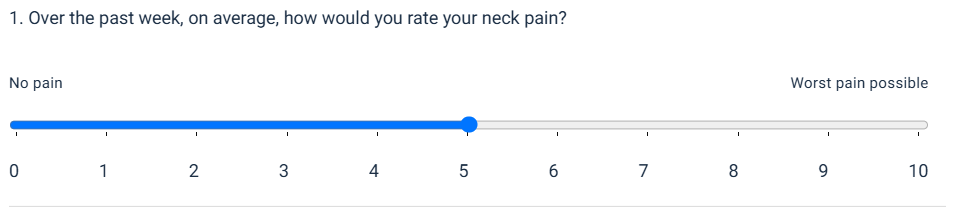
It's also the only control type that will load with a default value. In the response from the API, the controlValue and controlChecked will already be set. This is so the state in redux (if you're using the NPM packages) already has a value in state and is able to pass it back to the request successfully, if the user doesn't want to change from the default.
Implementing the control
If you're using the NPM packages, described in Traversal Client Quickstart, then you need only upgrade the packages and display should be handled for you.
If you're building your own frontend, there are a few elements you'll need to implement for best results.
The Slider
The slider aspect is relatively straight forward: Render an input of type=range with the value=answer.controlValue, min=answer.min, and max=answer.max.
1<input min="0" max="10" list="markers" type="range" class="RangeField__StyledInput-sc-w8ii5d-3 iBncCM" value="5">You'll notice a list property. We'll come to that later...
The Labels
If the labels exist, they will be inside the answers data["Properties"]. SliderMinLabel is the description given to the lowest value on the slider, and SliderMaxLabel to the highest. These will be clinically relevant and you MUST display them accordingly, if they exist.
In our NPM packages, we simple render these as a div and style it to display along the top of the slider.
1<div class="RangeField__TextLabelsWrapper-sc-w8ii5d-1 fbHGbg">
2  <span class="RangeField__TextLabel-sc-w8ii5d-2 kpChaK">No pain</span>
3  <span class="RangeField__TextLabel-sc-w8ii5d-2 kpChaK">Worst pain possible</span>
4</div>
The Markers
The markers are optional and are mainly for aesthetic purposes, but can help make the UX better for users. We recommend implementing these in all cases. But, ultimately, it's up to you.
In our NPM package, we take the min and max values and create a loop based on the step value of the input. This creates a datalist who's id is referenced in the input: <input list="markers" ... />. This is then styled to span the length of the slider.
1<datalist id="markers" class="RangeField__StyledDatalist-sc-w8ii5d-4 elSRln">
2  <option value="0" label="0"></option>
3  <option value="1" label="1"></option>
4  <option value="2" label="2"></option>
5  <option value="3" label="3"></option>
6  <option value="4" label="4"></option>
7  <option value="5" label="5"></option>
8  <option value="6" label="6"></option>
9  <option value="7" label="7"></option>
10  <option value="8" label="8"></option>
11  <option value="9" label="9"></option>
12  <option value="10" label="10"></option>
13</datalist>
Example Response
1{
2  "traversalId": "2387ab43-73e7-4f78-9c50-e6b0b07cb2c7",
3  "algoId": 5459,
4  "nodes": [
5    {
6      "nodeId": 6,
7      "assetId": 0,
8      "errors": [],
9      "displayText": null,
10      "title": null,
11      "explanation": null,
12      "data": null,
13      "questions": [
14        {
15          "nodeId": 6,
16          "questionId": 30242,
17          "displayText": "<b>Instructions:</b> The following scales have been designed to find out about your neck pain and how it is affecting you. \nPlease answer ALL the scales, and mark the ONE number on EACH scale that best describes how you feel.\n\n1. Over the past week, on average, how would you rate your neck pain?",
18          "title": null,
19          "answers": [
20            {
21              "nodeId": 6,
22              "questionId": 30242,
23              "answerId": 38687,
24              "controlType": "Range",
25              "controlValue": 5,
26              "controlChecked": true,
27              "displayText": "",
28              "explanation": "",
29              "data": {
30                "Properties": {
31                  "SliderMaxLabel": "Worst pain possible",
32                  "SliderMinLabel": "No pain"
33                }
34              },
35              "min": 0,
36              "max": 10
37            }
38          ],
39          "explanation": "",
40          "data": {}
41        }
42      ],
43      "isTable": false
44    }
45  ],
46  "assessmentType": 0,
47  "algoName": "Neck Bournemouth Questionnaire",
48  "errors": [],
49  "previousDisabled": true,
50  "nextDisabled": false,
51  "language": "ENGLISH",
52  "progress": {
53    "currentAverage": 7,
54    "easingMethod": "Exponential",
55    "estimatedPercentageComplete": 0
56  }
57}